Selecting an Organization and Space Group
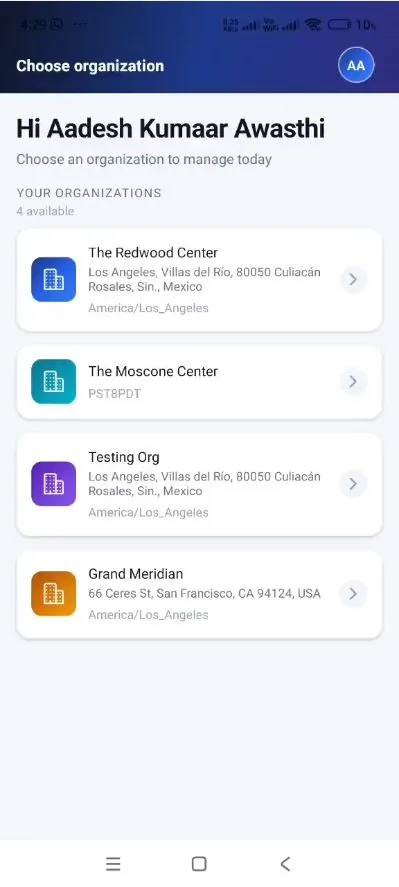
Step 8 — Select the organization to manage. Upon successful sign-in, the Choose organization screen greets the user by name and lists every organization the account is authorised to manage under Your Organizations, together with the number available and each organization’s address and timezone. Select an organization to open it. A different organization may be selected at any time from the account menu (refer to Section 7).
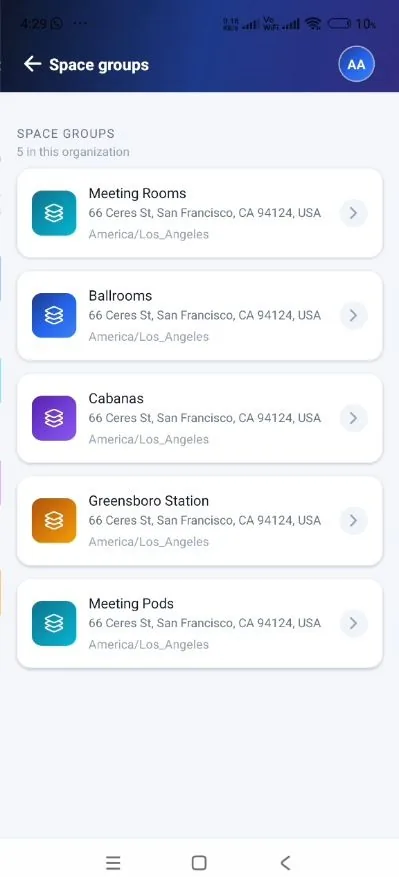
Step 9 — Select a space group. The organization opens on its Space groups screen, which shows how many groups exist in the organization and lists each group with its address and timezone. Space groups organise the bookable inventory by category or location (for example, Meeting Rooms, Ballrooms, or Meeting Pods). Select a group to view the meeting spaces it contains.
Step 8 — The Choose organization screen, listing every organization available to the account. |
Step 9 — Space groups within the selected organization, with address and timezone. |
|---|