Select & Enter Details
The space detail page confirms the space, its specifications, and amenities, then collects the organizer’s details. An Hourly / Full day switch at the top of the booking panel sets the pricing mode, and the selected slot and duration are restated above the form so the guest can confirm before continuing.
-
Choose Hourly or Full day. The toggle controls how the booking is priced and how the time picker behaves.
-
Check the availability period. Available From and Until dates show the window in which the space can be booked at all — separate from whether a given slot is free.
-
Confirm the slot. The chosen date, time range, and duration appear in the Selected Time Slot panel.
-
Enter organizer info. Full name, email, and phone are required; company is optional. These details flow through to the confirmation and the booking record.
-
Review the amount. Booking Amount reflects the duration and hourly rate, shown before any voucher discount is applied.
Note Billing is pro-rated against the hourly rate, so a 30-minute booking of a $25.00/hour space shows a Booking Amount of $12.50, while a one-hour booking of the same space shows $25.00. Minimum and maximum booking lengths (here 30m and 5h 0m) constrain what the guest can select.
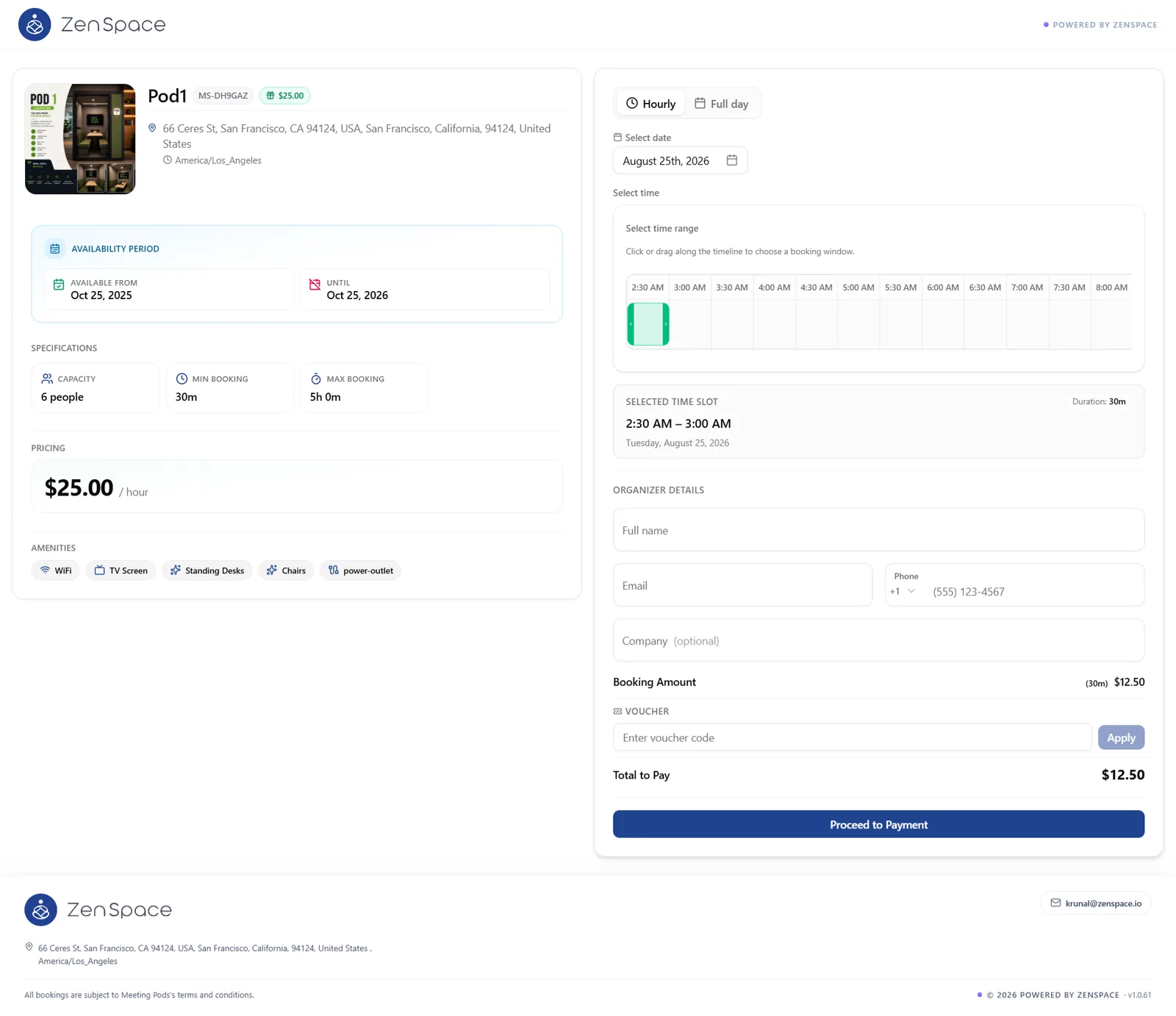
Figure 7 — Space detail with the Hourly / Full day switch, specifications, amenities, time selection, and the empty organizer form.